Beta Testers Wanted
We set out to study ride reliability. We accidentally discovered something more useful. Help us test it and get 1 year free.
How This Started
The original idea had nothing to do with walk-ons.
We'd been collecting ride status data across Disney, Universal, Six Flags, Cedar Fair, SeaWorld, and 30+ other US theme parks, every 5 minutes, since 2021. The goal was simple: are theme park rides getting more or less reliable over time? And if a ride goes down, can we predict how long it'll stay down?
The reliability study went fine. But while digging through the data, we found something we weren't looking for: a loophole.
When a ride comes back online after a breakdown, the wait time drops, often dramatically. Riders had scattered to other attractions while it was down. The queue was empty. And it stayed that way for a window of time before the crowd caught on and refilled the line.
That pattern kept showing up. Ride after ride, park after park. Breakdowns of over 30 minutes were especially reliable, long enough to clear the queue, short enough that people hadn't left the area. We were sitting on 335,000+ breakdown events across all tracked parks, and the signal was clear.
So we pivoted. Instead of just building a ride reliability dashboard, we added an app that watches for these moments in real time and tells you when to move.
What We Built
WalkOnAlerts is a mobile app that monitors ride breakdowns across 11 Disney and Universal parks. When a ride goes down and comes back with a good probability of having a low wait time, we send you a customizable push notification that the ride is now available. Behind every alert is a per-ride recovery model trained on that 5+ year dataset. The app knows exactly how each ride behaves after a breakdown, not just a guess based on averages.
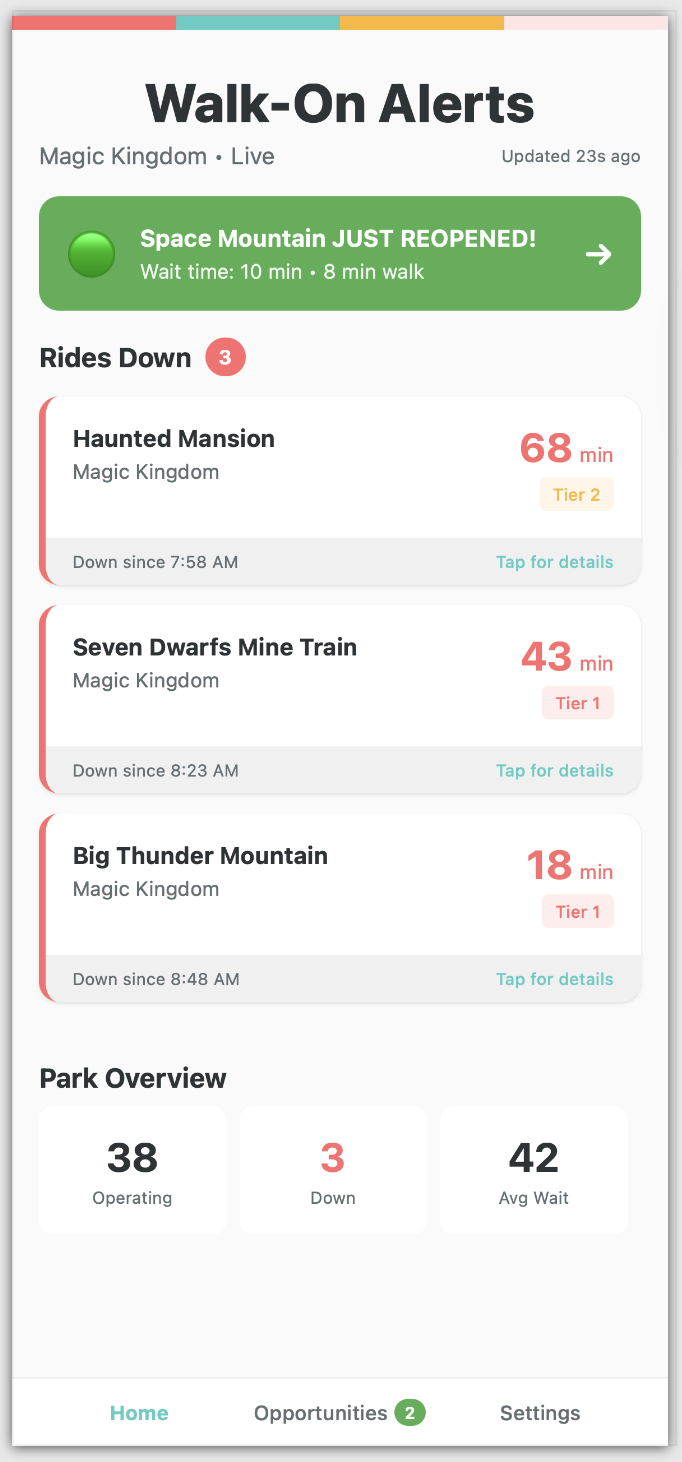
Live breakdown feed with reopening alerts
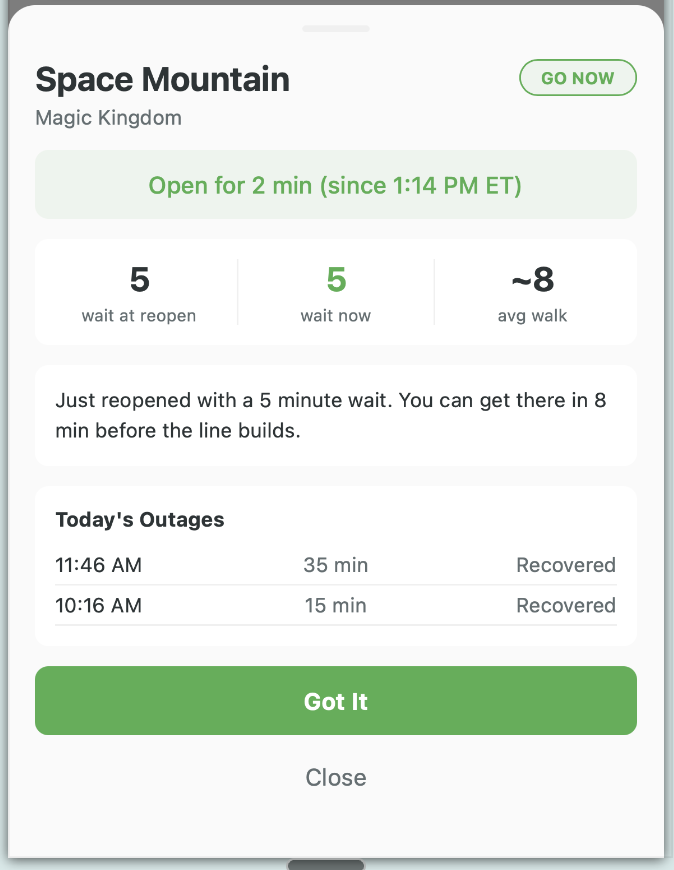
Ride detail with recovery context
What Works Today
The beta is rough around the edges, but the core loop is functional:
- Live breakdown feed: See every ride that's currently down across your selected parks, with how long it's been out.
- Reopening alerts: Push notifications when a ride comes back online, with the current wait time and your walking distance.
- Ride detail view: Tap any ride to see today's outage history, current wait, and whether it's worth heading over.
- Park overview: Quick glance at how many rides are operating, how many are down, and the average wait across the park.
- 11 Disney and Universal parks: Magic Kingdom, EPCOT, Hollywood Studios, Animal Kingdom, Disneyland, DCA, Universal Studios Florida, Islands of Adventure, Epic Universe, Universal Hollywood, and Volcano Bay.
What's not done yet: polished onboarding, walk time field testing, and about a hundred small UI things. That's where you come in.
Free vs Premium
Everyone gets alerts. The difference is timing.
- Free: All reopening alerts, predictions, and "opens before arrival" estimates, delivered 5 minutes after a ride comes back. Since most breakdowns last 20 minutes or more, a 5-minute delay still puts you ahead of anyone who isn’t watching.
- Premium: Same alerts, delivered instantly (within 60 seconds). You get a head start to reach the ride before the line refills. Also includes walk time estimates to every ride and GPS-based distances when you’re at the park.
Premium plans start at $7.99/day for a single park visit, with weekly ($19.99), monthly ($26.99), and yearly ($49.99) options.
Beta testers: You'll get 1 year of Premium free, including instant alerts, walk times, everything. We want you to experience the full app so your feedback covers the complete feature set. You can also test the purchase flow in sandbox mode (no real charges) to help us verify it works.
The Deal
Test the Beta. Get 1 Year Free.
Beta testers get a 1-year license to WalkOnAlerts (every feature, every update, no subscription for a full year). All we ask is that you use it on a real park visit and tell us what works, what doesn't, and what's missing.
earlyaccess@walkonalerts.comJust send us an email. Include your phone type (iPhone or Android) and which parks you visit most.
What We Need From Testers
You don't need to write formal bug reports. Just tell us what you think:
- Did the alerts arrive at the right time? Were they useful?
- Was the breakdown info accurate when you checked it against reality?
- What was confusing, annoying, or missing?
- Would you actually use this on your next trip?
Quick emails, screenshots, voice memos, whatever is easiest. We read everything.
Ideal testers: People with a Disney, Universal, or major theme park trip coming up in the next few months. You don't need to be technical. We want real park guests using this in real conditions.
How to Join
Send an email to earlyaccess@walkonalerts.com. Let us know:
- Whether you're on iPhone or Android
- Which parks you visit most often
- When your next trip is (roughly)
We'll send you a TestFlight invite within a few days. No registration or account creation needed. Just install and go.
Getting Started with TestFlight
TestFlight is Apple's official app for testing beta versions of iOS apps. Here's how to get set up:
- Install TestFlight: It's a free app from the App Store. Search for "TestFlight" or tap that link on your iPhone. If you already have it, you're good.
- Accept our invite: We'll email you a TestFlight invite link. Tap it on your iPhone and it will open TestFlight and show WalkOnAlerts ready to install.
- Install WalkOnAlerts: Tap "Install" in TestFlight. The app appears on your home screen like any other app.
- Allow notifications: When the app asks for notification permission, say yes. This is how you'll get ride reopening alerts. Without this, you won't receive any alerts.
That's it for installation. No account to create, no login, no credit card. The app identifies your device automatically.
Essential Setup (Do This First!)
After installing, go to Settings (bottom right of the app) and configure two things:
- Turn on Push Notifications and GO NOW Alerts: In the Notifications section, make sure "Push Notifications" is toggled on (turquoise). Then make sure "GO NOW Alerts" is also on. These are the key alerts that tell you when a ride just reopened with a likely walk-on window. You can also turn on "High Chance Alerts" if you want earlier predictions.
- Select your parks: Scroll down to "Watched Parks" and toggle on the parks you want to monitor. If you don't select any parks, you won't receive any alerts. Pick the parks you're planning to visit, or turn them all on if you're curious.
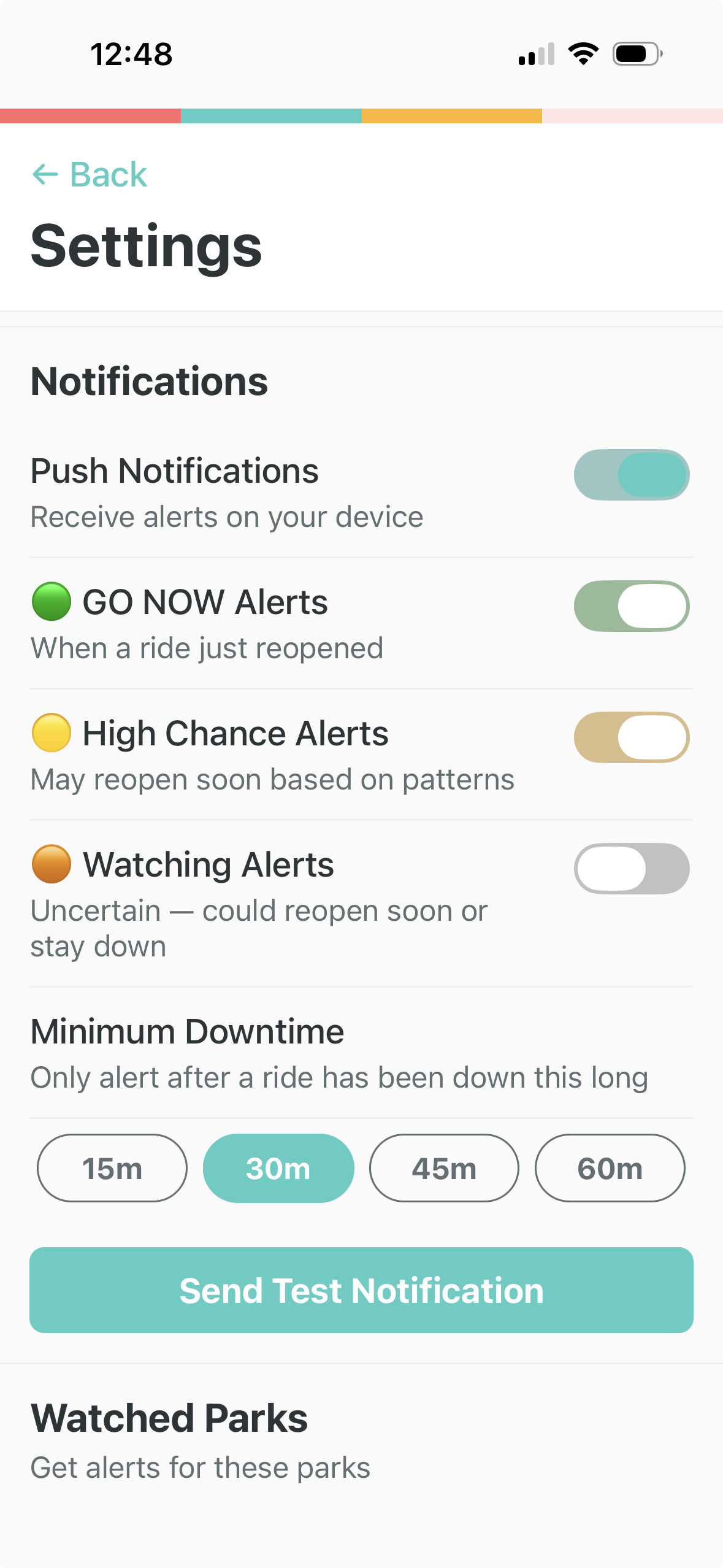
Turn on Push Notifications and GO NOW Alerts
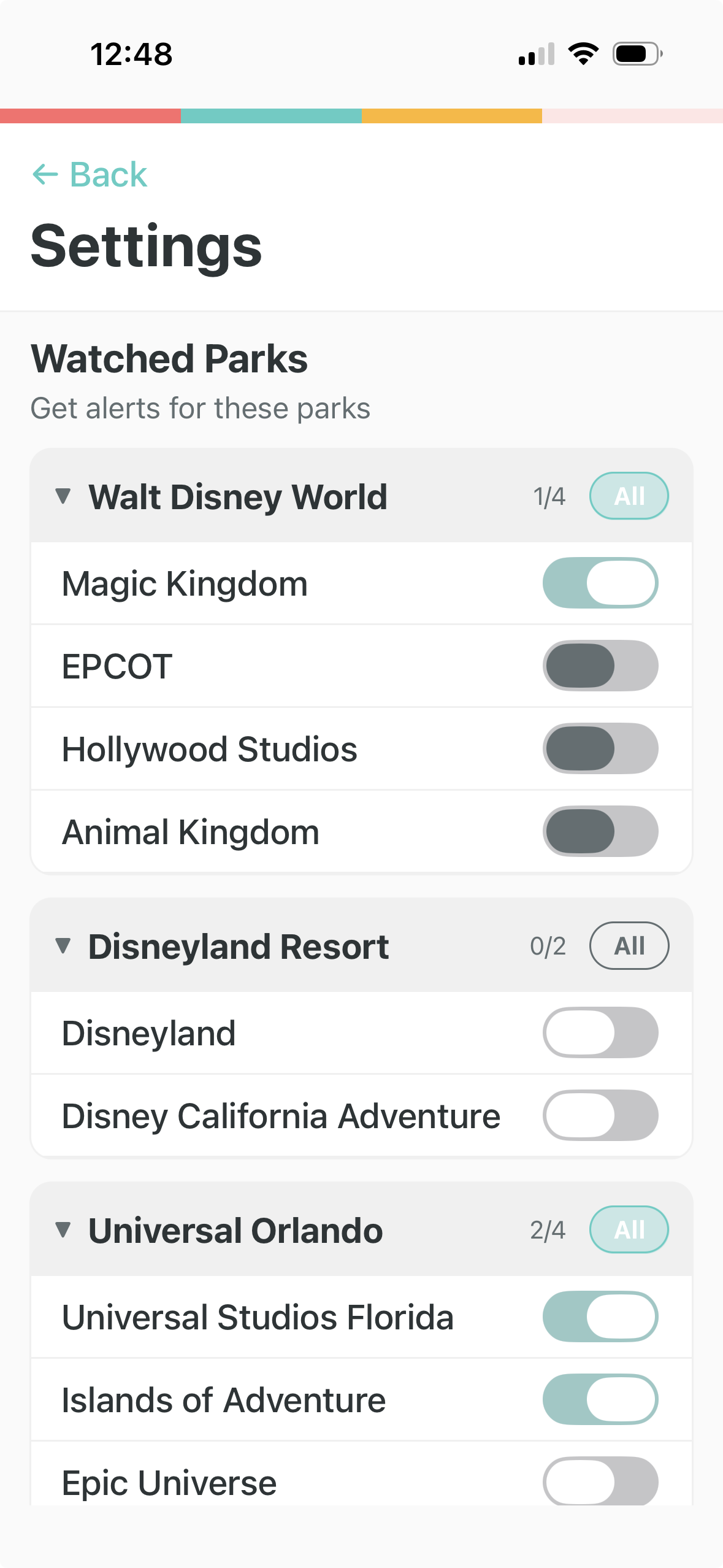
Select which parks to watch
You Don't Need to Be at a Park
WalkOnAlerts works from anywhere. You'll get live alerts about ride reopenings even if you're sitting on your couch. This is great for:
- Planning ahead: See which parks are having the most breakdowns today
- Getting familiar: Learn the alert patterns before your trip so you know what to expect
- Testing the app: Verify that alerts are arriving and the timing makes sense
When you're actually at a park, the app detects your GPS location and adds personalized walk time estimates to each alert, so you know exactly how long it'll take you to get to the ride.
Note: TestFlight betas expire after 90 days, but we push updates regularly. Each update resets the 90-day clock. You'll get a notification in TestFlight when a new build is available.
Testing In-App Purchases (Optional)
If you want to help us test the purchase flow, we'd love that, and we want to be very clear: you will not be charged. Not one cent. Ever.
TestFlight builds use Apple's sandbox environment, which simulates the entire purchase process without touching your real Apple ID or payment method. Here's what happens when you test a purchase:
- Open WalkOnAlerts and go to Settings → Upgrade to Premium
- Select any subscription tier (Daily, Weekly, Monthly, or Yearly)
- Tap the Subscribe button
- Apple shows a confirmation dialog. Notice it says "For testing purposes only. You will not be charged for confirming this purchase."
- Confirm with Face ID or the side button
- The app upgrades to Premium. The delay banner disappears and walk time estimates appear.
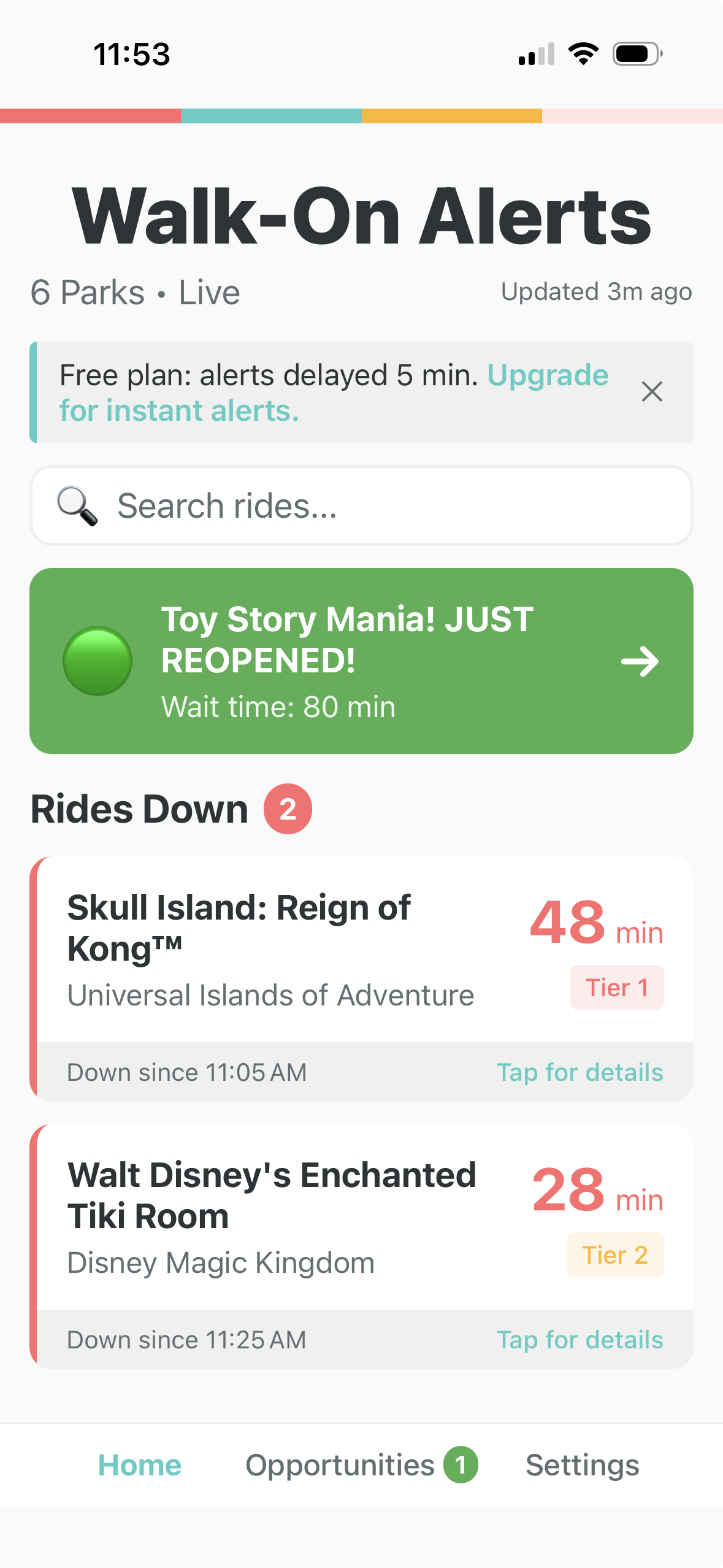
Free mode: alerts delayed 5 minutes
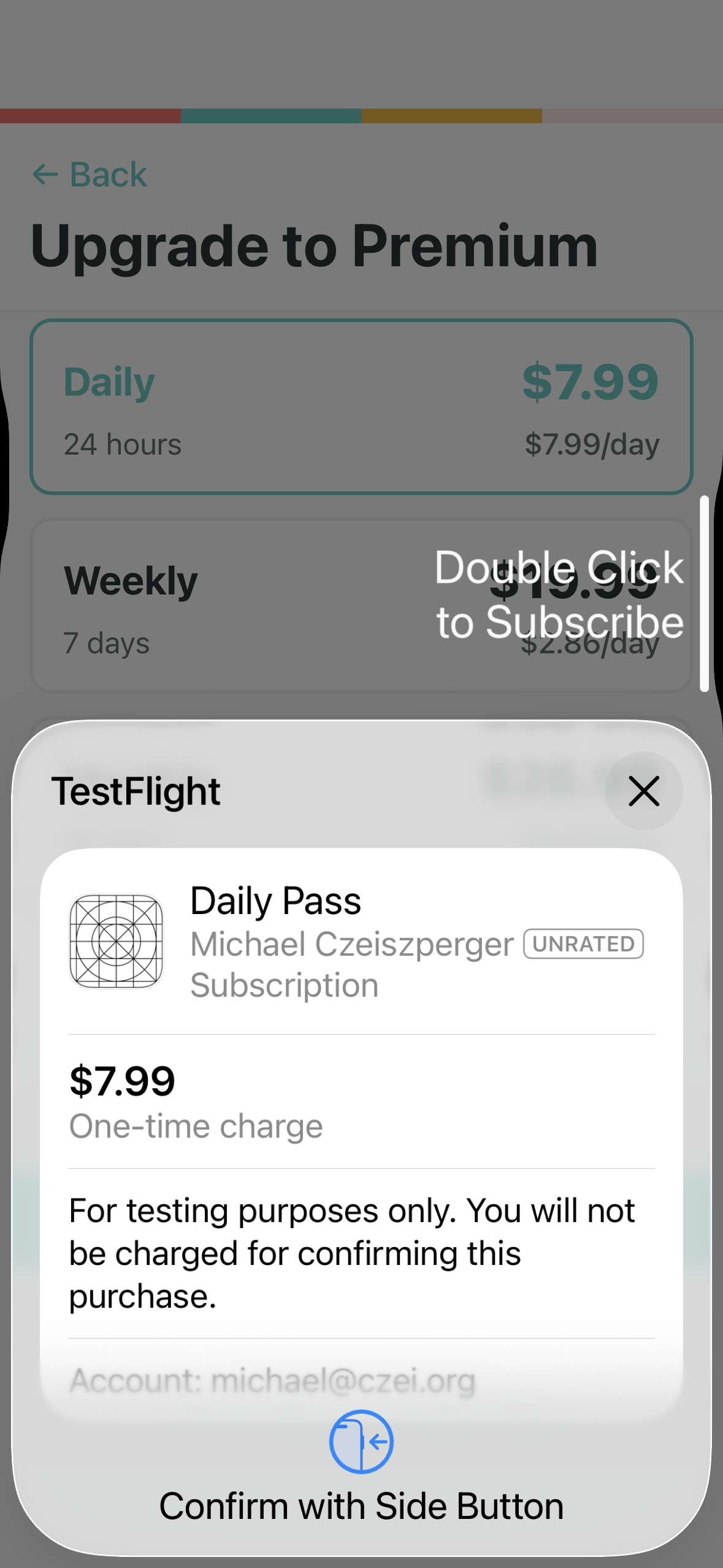
Sandbox purchase: no real charge
One thing to note: sandbox subscriptions renew on an accelerated schedule (a "weekly" plan renews every 3 minutes, "monthly" every 5 minutes, "yearly" every hour). This is normal Apple sandbox behavior for testing. Production subscriptions renew at their real intervals.
Spots are limited. We want to keep the group small enough that we can actually read and respond to every piece of feedback.